C basics: what the language is and where it is used
What C is
C is a small, compiled, general-purpose programming language. Dennis
Ritchie created it at Bell Labs in the early 1970s to write the
Unix operating system, and it is still the language of operating system
kernels, device drivers and language runtimes.
The language itself has few keywords. Everything else comes from a
standard library and from the headers of the system you build on, so a
C program is a set of functions, types and pointers compiled into one
executable file by a compiler such as
gcc.
C has no garbage collector: you allocate memory with malloc
and release it with free. That is what makes it fast and
what makes it demanding.
Where C is used
Operating systems (Linux,
Windows, macOS), embedded firmware,
databases, compilers and interpreters, network
servers and libraries with bindings for other languages are all written
in C or expose a C interface.
On this site the language has its own
course, a
textbook and articles on
pointers,
structures and
sockets.
Hello, world
Save this as hello.c. The main function is where execution begins, and printf writes a line to standard output.
#include <stdio.h>
int main(void)
{
printf("Hello, World!\n");
return 0;
}
Compile it and run the executable:
gcc -std=c17 -Wall -Wextra -Wpedantic hello.c -o hello
./hello
Hello, World!
The compiler reports warnings and errors before the program runs; read the first diagnostic and its line number. When the program is ready, continue with the C course, lesson by lesson.
Before you start
Before you start programming, it will be useful to find and read a book about the operating system.
The system in which you want to do it.
For example, it is useful to know about the system variable.
PATH
.
If you want to program in C from Windows You might need an article.
Installation of the GCC compiler in Windows
a.out
If, after compilation, by gcc You have a file. a.out And you don’t know what to do with it:
./a.out
If you want the executable file not to be named after compilation a.out In other words, you will use the option o.
gcc -o new_name code.c
After compilation, you will receive an executable file. new_name It will have to be launched with the help of
./new_name
Number conversion
For beginners, it may seem very surprising to convert numbers.
Suppose you enter 9. And you want it printed for you. And you get 57.
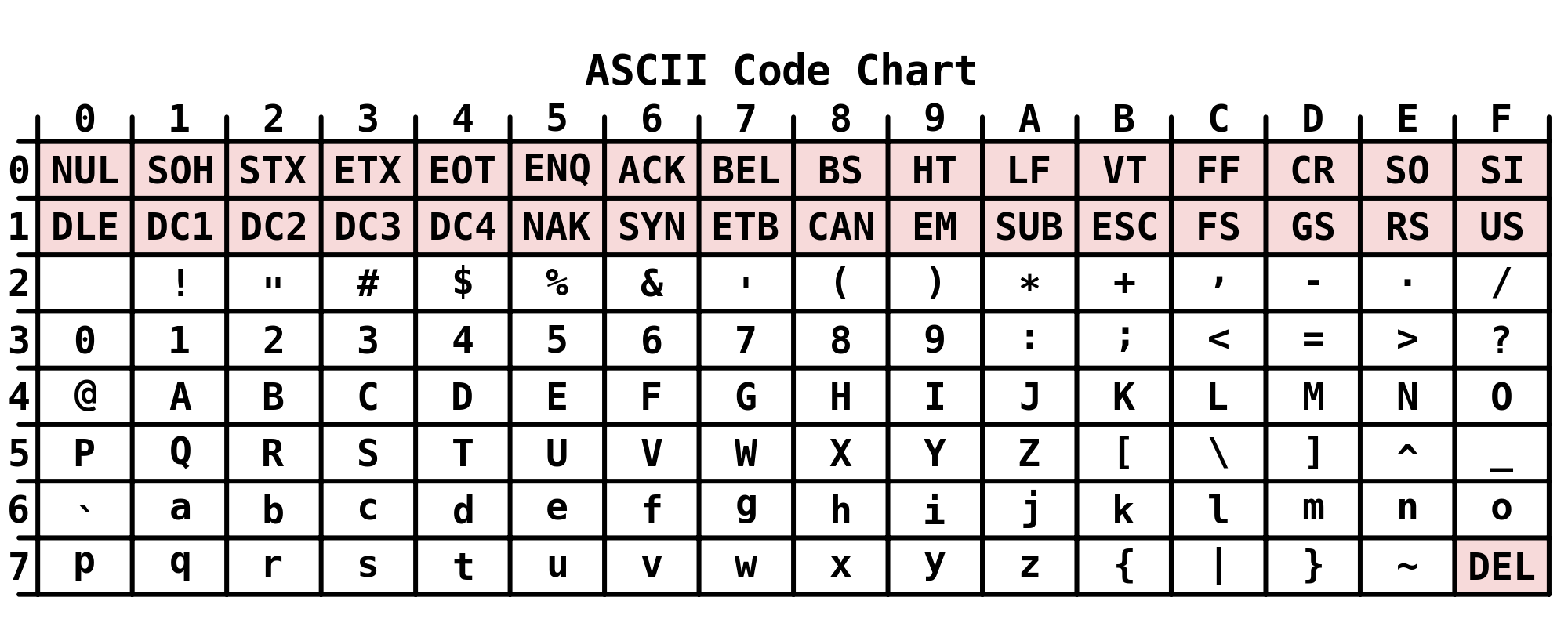
To understand this issue, you need to open the ASCII symbol table.
reference
And find the 9 in it. It corresponds to the hexadecimal number 39. To give you the result, the computer converts 39 to
decimal form according to the formula x = 3*16 + 9*1 = 57.
Solving problems from the Kernighan and Ritchie textbook
Bitwise operations
| Number dec | Operator | Number dec | Result dec | Result bin |
|---|---|---|---|---|
| 170 | 1010 1010 | |||
| 90 | 0101 1010 | |||
| 170 | & | 90 | 10 | 0000 1010 |
| 170 | | | 90 | 250 | 1111 1010 |
| 170 | ^ | 90 | 240 | 1111 0000 |
| 170 | >> | 3 | 21 | 0001 0101 |
| 170 | << | 4 | 160 | 1010 0000 |
Article author: Arthur Isaev
