C development
| Introduction | |
| a.out | |
| Number conversion | |
| Bitwise operations | |
| Other articles on C |
Introduction
Before you start programming, it will be useful to find and read a book about the operating system.
The system in which you want to do it.
For example, it is useful to know about the system variable.
PATH
.
If you want to program in C from Windows You might need an article.
Installation of the GCC compiler in Windows
a.out
If, after compilation, by gcc You have a file. a.out And you don’t know what to do with it:
./a.out
If you want the executable file not to be named after compilation a.out In other words, you will use the option o.
gcc -o new_name code.c
After compilation, you will receive an executable file. new_name It will have to be launched with the help of
./new_name
Number conversion
For beginners, it may seem very surprising to convert numbers.
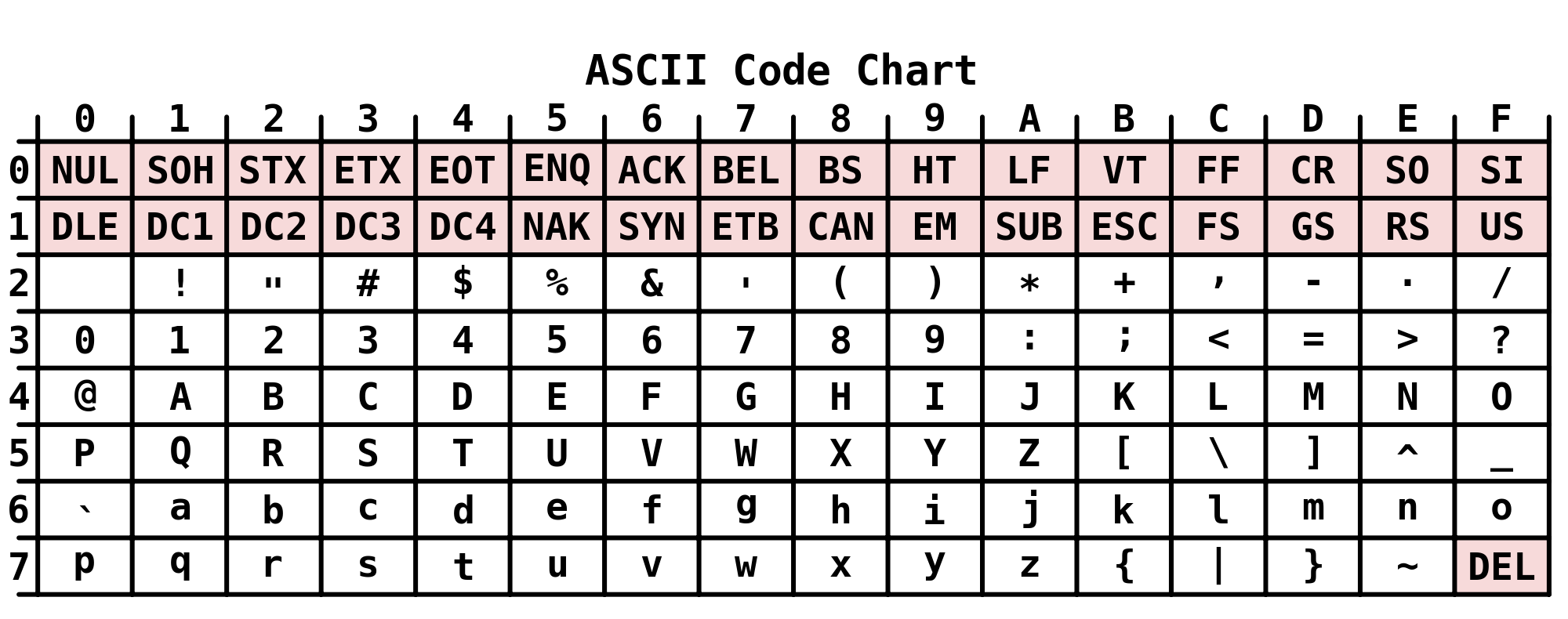
Suppose you enter 9. And you want it printed for you. And you get 57.
To understand this issue, you need to open the ASCII symbol table.
reference
And find the 9 in it. It corresponds to the hexadecimal number 39. To give you the result, the computer converts 39 to
decimal form according to the formula x = 3*16 + 9*1 = 57 9*1 = 57
Solving problems from the Kernighan and Richie textbook
Bitwise operations
| Number dec | Operator | Number dec | Result dec | Result bin | ||
|---|---|---|---|---|---|---|
| 170 | → | 1010 1010 | ||||
| 90 | → | 0101 1010 | ||||
| 170 | & | 90 | → | 10 | → | 0000 1010 |
| 170 | | | 90 | → | 250 | → | 1111 1010 |
| 170 | ^ | 90 | → | 240 | → | 1111 0000 |
| 170 | >> | 3 | → | 21 | → | 0001 0101 |
| 170 | << | 4 | → | 160 | → | 1010 0000 |
Article author: Andrei Olegovich
| C development | |
| Textbook on C | |
| Boolean in C | |
| Sockets in C | |
| K&R | |
| What is argc, char * argv[] | |
| Function scanf() | |
| Pointers | |
| Structures in C | |
| Operator «arrow» pointer to member structure |