PyWinAuto
| Введение | |
| Установка | |
| Пример применения | |
| print_control_identifiers() | |
| Объекты во вложенных меню | |
| Пример поиска вложенного объекта | |
| Похожие статьи |
Введение
В этой статье вы можете изучить простые примеры автоматизации работы с блокнотом Windows
Пример
from pywinauto.application import Application app = Application(backend='uia').start('notepad.exe') # app = Application(backend='win32').start('')
python pywinauto_tutorial.py

pywinauto
from pywinauto.application import Application app = Application(backend='uia').start('notepad.exe') app = Application(backend='uia').connect(title='Untitled - Notepad', timeout=100)
pywinauto
print_control_identifiers()
Чтобы управлять приложением, нужно получить список объектов - контроллеров. Сделать это можно с помощью print_control_identifiers()
print_control_identifiers() выводит на экран список всех контроллеров доступных из текущего состояния приложения а не вообще все контроллеры.
from pywinauto.application import Application app = Application(backend='uia').start('notepad.exe') app = Application(backend='uia').connect(title='Untitled - Notepad', timeout=100) app.UntitledNotepad.print_control_identifiers()
Control Identifiers: Dialog - 'Untitled - Notepad' (L-1127, T248, R-579, B1034) ['Untitled - Notepad', 'Untitled - NotepadDialog', 'Dialog'] child_window(title="Untitled - Notepad", control_type="Window") | | Edit - 'Text Editor' (L-1118, T311, R-588, B996) | ['Edit', 'Edit0', 'Edit1'] | child_window(title="Text Editor", auto_id="15", control_type="Edit") | | | | ScrollBar - 'Vertical' (L-609, T311, R-588, B975) | | ['VerticalScrollBar', 'Vertical', 'ScrollBar', 'ScrollBar0', 'ScrollBar1'] | | child_window(title="Vertical", auto_id="NonClientVerticalScrollBar", control_type="ScrollBar") | | | | | | Button - 'Line up' (L-609, T311, R-588, B332) | | | ['Button', 'Line up', 'Line upButton', 'Button0', 'Button1'] | | | child_window(title="Line up", auto_id="UpButton", control_type="Button") | | | | | | Button - 'Line down' (L-609, T954, R-588, B975) | | | ['Button2', 'Line downButton', 'Line down'] | | | child_window(title="Line down", auto_id="DownButton", control_type="Button") | | | | ScrollBar - 'Horizontal' (L-1118, T975, R-609, B996) | | ['HorizontalScrollBar', 'ScrollBar2', 'Horizontal'] | | child_window(title="Horizontal", auto_id="NonClientHorizontalScrollBar", control_type="ScrollBar") | | | | | | Button - 'Column left' (L-1118, T975, R-1097, B996) | | | ['Button3', 'Column left', 'Column leftButton'] | | | child_window(title="Column left", auto_id="UpButton", control_type="Button") | | | | | | Button - 'Column right' (L-630, T975, R-609, B996) | | | ['Button4', 'Column rightButton', 'Column right'] | | | child_window(title="Column right", auto_id="DownButton", control_type="Button") | | | | Thumb - '' (L-609, T975, R-588, B996) | | ['Thumb'] | | StatusBar - 'Status Bar' (L-1118, T996, R-588, B1025) | ['StatusBar', 'Status Bar', 'Status BarStatusBar'] | child_window(title="Status Bar", auto_id="1025", control_type="StatusBar") | | | | Static - '' (L0, T0, R0, B0) | | ['Static', 'Static0', 'Static1'] | | | | Static - ' Ln 1, Col 1' (L-1118, T998, R-951, B1025) | | [' Ln 1, Col 1Static', 'Static2', ' Ln 1, Col 1'] | | child_window(title=" Ln 1, Col 1", control_type="Text") | | | | Static - ' 100%' (L-949, T998, R-888, B1025) | | [' 100%Static', ' 100%', 'Static3'] | | child_window(title=" 100%", control_type="Text") | | | | Static - ' Windows (CRLF)' (L-886, T998, R-738, B1025) | | [' Windows (CRLF)Static', ' Windows (CRLF)', 'Static4'] | | child_window(title=" Windows (CRLF)", control_type="Text") | | | | Static - ' UTF-8' (L-736, T998, R-608, B1025) | | [' UTF-8', ' UTF-8Static', 'Static5'] | | child_window(title=" UTF-8", control_type="Text") | | TitleBar - '' (L-1098, T251, R-588, B286) | ['TitleBar'] | | | | Menu - 'System' (L-1118, T257, R-1090, B285) | | ['System', 'Menu', 'SystemMenu', 'System0', 'System1', 'Menu0', 'Menu1'] | | child_window(title="System", auto_id="MenuBar", control_type="MenuBar") | | | | | | MenuItem - 'System' (L-1118, T257, R-1090, B285) | | | ['System2', 'SystemMenuItem', 'MenuItem', 'MenuItem0', 'MenuItem1'] | | | child_window(title="System", control_type="MenuItem") | | | | Button - 'Minimize' (L-766, T249, R-706, B286) | | ['Button5', 'Minimize', 'MinimizeButton'] | | child_window(title="Minimize", control_type="Button") | | | | Button - 'Maximize' (L-706, T249, R-647, B286) | | ['Button6', 'Maximize', 'MaximizeButton'] | | child_window(title="Maximize", control_type="Button") | | | | Button - 'Close' (L-647, T249, R-587, B286) | | ['Button7', 'Close', 'CloseButton'] | | child_window(title="Close", control_type="Button") | | Menu - 'Application' (L-1118, T286, R-588, B310) | ['Application', 'Menu2', 'ApplicationMenu'] | child_window(title="Application", auto_id="MenuBar", control_type="MenuBar") | | | | MenuItem - 'File' (L-1118, T286, R-1081, B310) | | ['FileMenuItem', 'File', 'MenuItem2'] | | child_window(title="File", control_type="MenuItem") | | | | MenuItem - 'Edit' (L-1081, T286, R-1041, B310) | | ['Edit2', 'EditMenuItem', 'MenuItem3'] | | child_window(title="Edit", control_type="MenuItem") | | | | MenuItem - 'Format' (L-1041, T286, R-980, B310) | | ['Format', 'FormatMenuItem', 'MenuItem4'] | | child_window(title="Format", control_type="MenuItem") | | | | MenuItem - 'View' (L-980, T286, R-934, B310) | | ['View', 'ViewMenuItem', 'MenuItem5'] | | child_window(title="View", control_type="MenuItem") | | | | MenuItem - 'Help' (L-934, T286, R-888, B310) | | ['MenuItem6', 'HelpMenuItem', 'Help'] | | child_window(title="Help", control_type="MenuItem")
from pywinauto.application import Application app = Application(backend='uia').start('notepad.exe') app = Application(backend='uia').connect( title='Untitled - Notepad', timeout=100 ) # app.UntitledNotepad.print_control_identifiers() text_editor = app.UntitledNotepad.child_window( title="Text Editor", auto_id="15", control_type="Edit" ).wrapper_object() text_editor.type_keys( "Subscribe to t.me/aofeed", with_spaces=True )

pywinauto
Часто контроллеров очень много и смотреть на их вывод в терминал неудобно.
Решается эта проблема записью в файл, который нужно указать как аргумент
app.MyApp.print_control_identifiers(filename="controls.txt")
Файл controls.txt будет создан в рабочей директории, то есть скорее всего рядом с запускаемым .exe файлом а не рядом со скриптом.
Объекты во вложенных меню
Когда мы в первый раз использовали
print_control_identifiers()
был получен список всех контроллеров, доступных из стартового окна.
Чтобы полуить списки контроллеров, которые доступны из подменю, нужно сперва выполнить
click_input()
на нужное меню и затем сразу же выполнить
print_control_identifiers()
Действуя по этому алгоритму можно создать библиотеку из всех доступных контроллеров.
from pywinauto.application import Application app = Application(backend='uia').start('notepad.exe') app = Application(backend='uia').connect( title='Untitled - Notepad', timeout=100 ) # app.UntitledNotepad.print_control_identifiers() text_editor = app.UntitledNotepad.child_window( title="Text Editor", auto_id="15", control_type="Edit" ).wrapper_object() text_editor.type_keys( "Subscribe to t.me/aofeed", with_spaces=True ) file_menu = app.UntitledNotepad.child_window(title="File", control_type="MenuItem").wrapper_object() file_menu.click_input() app.UntitledNotepad.print_control_identifiers()
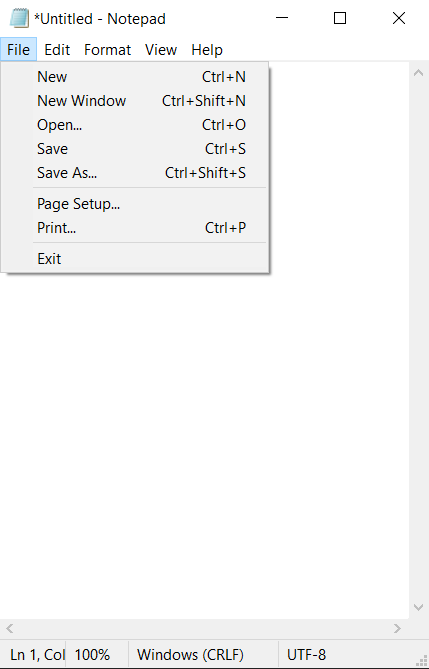
pywinauto
Control Identifiers: Dialog - '*Untitled - Notepad' (L-1512, T253, R641, B1009) ['*Untitled - Notepad', 'Dialog', '*Untitled - NotepadDialog'] child_window(title="*Untitled - Notepad", control_type="Window") | | Menu - 'File' (L-1503, T315, R-1234, B527) | ['File', 'FileMenu', 'Menu', 'Menu0', 'Menu1', 'File0', 'File1'] | child_window(title="File", control_type="Menu") | | | | MenuItem - 'New Ctrl+N' (L-1500, T318, R-1237, B342) | | ['New\tCtrl+N', 'New\tCtrl+NMenuItem', 'MenuItem', 'MenuItem0', 'MenuItem1'] | | child_window(title="New Ctrl+N", auto_id="1", control_type="MenuItem") | | | | MenuItem - 'New Window Ctrl+Shift+N' (L-1500, T342, R-1237, B366) | | ['MenuItem2', 'New Window\tCtrl+Shift+N', 'New Window\tCtrl+Shift+NMenuItem'] | | child_window(title="New Window Ctrl+Shift+N", auto_id="8", control_type="MenuItem") | | | | MenuItem - 'Open... Ctrl+O' (L-1500, T366, R-1237, B390) | | ['Open...\tCtrl+O', 'Open...\tCtrl+OMenuItem', 'MenuItem3'] | | child_window(title="Open... Ctrl+O", auto_id="2", control_type="MenuItem") | | | | MenuItem - 'Save Ctrl+S' (L-1500, T390, R-1237, B414) | | ['Save\tCtrl+SMenuItem', 'Save\tCtrl+S', 'MenuItem4'] | | child_window(title="Save Ctrl+S", auto_id="3", control_type="MenuItem") | | | | MenuItem - 'Save As... Ctrl+Shift+S' (L-1500, T414, R-1237, B438) | | ['MenuItem5', 'Save As...\tCtrl+Shift+S', 'Save As...\tCtrl+Shift+SMenuItem'] | | child_window(title="Save As... Ctrl+Shift+S", auto_id="4", control_type="MenuItem") | | | | MenuItem - 'Page Setup...' (L-1500, T445, R-1237, B469) | | ['Page Setup...MenuItem', 'MenuItem6', 'Page Setup...'] | | child_window(title="Page Setup...", auto_id="5", control_type="MenuItem") | | | | MenuItem - 'Print... Ctrl+P' (L-1500, T469, R-1237, B493) | | ['Print...\tCtrl+P', 'MenuItem7', 'Print...\tCtrl+PMenuItem'] | | child_window(title="Print... Ctrl+P", auto_id="6", control_type="MenuItem") | | | | MenuItem - 'Exit' (L-1500, T500, R-1237, B524) | | ['Exit', 'ExitMenuItem', 'MenuItem8'] | | child_window(title="Exit", auto_id="7", control_type="MenuItem") | | Edit - 'Text Editor' (L-1503, T316, R632, B971) | ['Edit', 'Edit0', 'Edit1'] | child_window(title="Text Editor", auto_id="15", control_type="Edit") | | | | ScrollBar - 'Vertical' (L611, T316, R632, B950) | | ['Vertical', 'ScrollBar', 'VerticalScrollBar', 'ScrollBar0', 'ScrollBar1'] | | child_window(title="Vertical", auto_id="NonClientVerticalScrollBar", control_type="ScrollBar") | | | | | | Button - 'Line up' (L611, T316, R632, B337) | | | ['Line up', 'Line upButton', 'Button', 'Button0', 'Button1'] | | | child_window(title="Line up", auto_id="UpButton", control_type="Button") | | | | | | Button - 'Line down' (L611, T929, R632, B950) | | | ['Line down', 'Line downButton', 'Button2'] | | | child_window(title="Line down", auto_id="DownButton", control_type="Button") | | | | ScrollBar - 'Horizontal' (L-1503, T950, R611, B971) | | ['Horizontal', 'ScrollBar2', 'HorizontalScrollBar'] | | child_window(title="Horizontal", auto_id="NonClientHorizontalScrollBar", control_type="ScrollBar") | | | | | | Button - 'Column left' (L-1503, T950, R-1482, B971) | | | ['Column leftButton', 'Column left', 'Button3'] | | | child_window(title="Column left", auto_id="UpButton", control_type="Button") | | | | | | Button - 'Column right' (L590, T950, R611, B971) | | | ['Button4', 'Column right', 'Column rightButton'] | | | child_window(title="Column right", auto_id="DownButton", control_type="Button") | | | | Thumb - '' (L611, T950, R632, B971) | | ['Thumb'] | | StatusBar - 'Status Bar' (L-1503, T971, R632, B1000) | ['StatusBar', 'Status Bar', 'Status BarStatusBar'] | child_window(title="Status Bar", auto_id="1025", control_type="StatusBar") | | | | Static - '' (L-1503, T973, R94, B1000) | | ['Static', 'Static0', 'Static1'] | | | | Static - ' Ln 1, Col 25' (L96, T973, R269, B1000) | | [' Ln 1, Col 25', 'Static2', ' Ln 1, Col 25Static'] | | child_window(title=" Ln 1, Col 25", control_type="Text") | | | | Static - ' 100%' (L271, T973, R332, B1000) | | ['Static3', ' 100%', ' 100%Static'] | | child_window(title=" 100%", control_type="Text") | | | | Static - ' Windows (CRLF)' (L334, T973, R482, B1000) | | [' Windows (CRLF)', ' Windows (CRLF)Static', 'Static4'] | | child_window(title=" Windows (CRLF)", control_type="Text") | | | | Static - ' UTF-8' (L484, T973, R612, B1000) | | [' UTF-8Static', 'Static5', ' UTF-8'] | | child_window(title=" UTF-8", control_type="Text") | | TitleBar - '' (L-1483, T256, R632, B291) | ['TitleBar'] | | | | Menu - 'System' (L-1503, T262, R-1475, B290) | | ['System', 'SystemMenu', 'Menu2', 'System0', 'System1'] | | child_window(title="System", auto_id="MenuBar", control_type="MenuBar") | | | | | | MenuItem - 'System' (L-1503, T262, R-1475, B290) | | | ['System2', 'MenuItem9', 'SystemMenuItem'] | | | child_window(title="System", control_type="MenuItem") | | | | Button - 'Minimize' (L454, T254, R514, B291) | | ['Minimize', 'MinimizeButton', 'Button5'] | | child_window(title="Minimize", control_type="Button") | | | | Button - 'Maximize' (L514, T254, R573, B291) | | ['Button6', 'Maximize', 'MaximizeButton'] | | child_window(title="Maximize", control_type="Button") | | | | Button - 'Close' (L573, T254, R633, B291) | | ['CloseButton', 'Close', 'Button7'] | | child_window(title="Close", control_type="Button") | | Menu - 'Application' (L-1503, T291, R632, B315) | ['ApplicationMenu', 'Application', 'Menu3'] | child_window(title="Application", auto_id="MenuBar", control_type="MenuBar") | | | | MenuItem - 'File' (L-1503, T291, R-1466, B315) | | ['File2', 'MenuItem10', 'FileMenuItem'] | | child_window(title="File", control_type="MenuItem") | | | | MenuItem - 'Edit' (L-1466, T291, R-1426, B315) | | ['EditMenuItem', 'MenuItem11', 'Edit2'] | | child_window(title="Edit", control_type="MenuItem") | | | | MenuItem - 'Format' (L-1426, T291, R-1365, B315) | | ['FormatMenuItem', 'MenuItem12', 'Format'] | | child_window(title="Format", control_type="MenuItem") | | | | MenuItem - 'View' (L-1365, T291, R-1319, B315) | | ['View', 'ViewMenuItem', 'MenuItem13'] | | child_window(title="View", control_type="MenuItem") | | | | MenuItem - 'Help' (L-1319, T291, R-1273, B315) | | ['Help', 'HelpMenuItem', 'MenuItem14'] | | child_window(title="Help", control_type="MenuItem")
Пример поиска вложенного объекта
Откроем новое окно.
Для этого в предыдущем выводе найдём
… | | MenuItem - 'New Window Ctrl+Shift+N' (L-1500, T342, R-1237, B366) | | ['MenuItem2', 'New Window\tCtrl+Shift+N', 'New Window\tCtrl+Shift+NMenuItem'] | | child_window(title="New Window Ctrl+Shift+N", auto_id="8", control_type="MenuItem") …
Скопируем строку с clild_window, но вместо New Window Ctrl+Shift+N используем New Window\tCtrl+Shift+N
from pywinauto.application import Application app = Application(backend='uia').start('notepad.exe') app = Application(backend='uia').connect( title='Untitled - Notepad', timeout=100 ) # app.UntitledNotepad.print_control_identifiers() text_editor = app.UntitledNotepad.child_window( title="Text Editor", auto_id="15", control_type="Edit" ).wrapper_object() text_editor.type_keys( "Subscribe to t.me/aofeed", with_spaces=True ) file_menu = app.UntitledNotepad.child_window( title="File", control_type="MenuItem" ).wrapper_object() file_menu.click_input() app.UntitledNotepad.print_control_identifiers() new_window = app.UntitledNotepad.child_window( title="New Window\tCtrl+Shift+N", auto_id="8", control_type="MenuItem" ).wrapper_object() new_window.click_input()
Диалоговое окно
Для простоты не будем открывать новое окно. Откроем блокнот, введём текст и с помощью контроллера close
… | | Button - 'Close' (L573, T254, R633, B291) | | ['CloseButton', 'Close', 'Button7'] | | child_window(title="Close", control_type="Button") …
закроем блокнот. Появится диалоговое окно Save, Don't Save и так далее.
В этот момент нужно распечатать контроллеры этого диалогового окна и использовать нужный.
from pywinauto.application import Application app = Application(backend='uia').start('notepad.exe') app = Application(backend='uia').connect( title='Untitled - Notepad', timeout=100 ) text_editor = app.UntitledNotepad.child_window( title="Text Editor", auto_id="15", control_type="Edit" ).wrapper_object() text_editor.type_keys( "Subscribe to t.me/aofeed", with_spaces=True ) file_menu = app.UntitledNotepad.child_window( title="File", control_type="MenuItem" ).wrapper_object() file_menu.click_input() close = app.UntitledNotepad.child_window( title="Close", control_type="Button" ).wrapper_object() close.click_input() app.UntitledNotepad.print_control_identifiers() dont_save = app.UntitledNotepad.child_window( title="Don't Save", auto_id="CommandButton_7", control_type="Button" ).wrapper_object() dont_save.click_input()
… Control Identifiers: Dialog - '*Untitled - Notepad' (L321, T173, R769, B851) ['Dialog', '*Untitled - Notepad', '*Untitled - NotepadDialog', 'Dialog0', 'Dialog1'] child_window(title="*Untitled - Notepad", control_type="Window") | | Dialog - 'Notepad' (L1042, T568, R1500, B745) | ['Notepad', 'Dialog2', 'NotepadDialog'] | child_window(title="Notepad", control_type="Window") | | | | Static - 'Do you want to save changes to Untitled?' (L1064, T619, R1427, B647) | | ['Static', 'Do you want to save changes to Untitled?', 'Do you want to save changes to Untitled?Static', 'Static0', 'Static1'] | | child_window(title="Do you want to save changes to Untitled?", auto_id="MainInstruction", control_type="Text") | | | | Static - '' (L0, T0, R0, B0) | | ['Static2'] | | child_window(auto_id="ContentText", control_type="Text") | | | | Button - 'Save' (L1174, T696, R1261, B725) | | ['Button', 'Save', 'SaveButton', 'Button0', 'Button1'] | | child_window(title="Save", auto_id="CommandButton_6", control_type="Button") | | | | Button - 'Don't Save' (L1269, T696, R1383, B725) | | ['Button2', "Don't SaveButton", "Don't Save"] | | child_window(title="Don't Save", auto_id="CommandButton_7", control_type="Button") | | | | Button - 'Cancel' (L1391, T696, R1478, B725) | | ['Cancel', 'Button3', 'CancelButton'] | | child_window(title="Cancel", auto_id="CommandButton_2", control_type="Button") | | | | TitleBar - '' (L1051, T571, R1491, B606) | | ['TitleBar', 'TitleBar0', 'TitleBar1'] | | | | | | Button - 'Close' (L1448, T569, R1492, B606) | | | ['Button4', 'CloseButton', 'Close', 'CloseButton0', 'CloseButton1', 'Close0', 'Close1'] | | | child_window(title="Close", control_type="Button") …
Notepad в Windows 11
Блокнот в одиннадцатой версии Windows поддерживает создание вкладок и сильно отличается от предыдущих версий.
Control Identifiers: Dialog - 'Untitled - Notepad' (L55, T174, R1707, B1070) ['Dialog', 'Untitled - NotepadDialog', 'Untitled - Notepad'] child_window(title="Untitled - Notepad", control_type="Window") | | Pane - '' (L61, T249, R1701, B1032) | ['Pane', 'UntitledPane', 'Pane0', 'Pane1', 'UntitledPane0', 'UntitledPane1'] | | | | Document - '' (L61, T249, R1701, B1032) | | ['Document', 'UntitledDocument'] | | Pane - '' (L101, T184, R388, B216) | ['Pane2', 'UntitledPane2'] | | | | TabControl - '' (L101, T184, R388, B216) | | ['TabControl', 'TabControlAdd New Tab', 'UntitledTabControl'] | | child_window(auto_id="Tabs", control_type="Tab") | | | | | | ListBox - '' (L103, T184, R353, B216) | | | ['ListBox', 'UntitledListBox'] | | | child_window(auto_id="TabListView", control_type="List") | | | | | | | | TabItem - 'Untitled. Unmodified.' (L105, T184, R351, B216) | | | | ['TabItem', 'Untitled. Unmodified.TabItem', 'Untitled. Unmodified.'] | | | | child_window(title="Untitled. Unmodified.", control_type="TabItem") | | | | | | | | | | Static - 'Untitled' (L118, T192, R162, B207) | | | | | ['UntitledStatic', 'Static', 'Untitled', 'Static0', 'Static1'] | | | | | child_window(title="Untitled", control_type="Text") | | | | | | | | | | Button - 'Close Tab' (L310, T188, R342, B212) | | | | | ['Button', 'Close Tab', 'Close TabButton', 'Button0', 'Button1'] | | | | | child_window(title="Close Tab", auto_id="CloseButton", control_type="Button") | | | | | | Button - 'Add New Tab' (L356, T189, R388, B213) | | | ['Button2', 'Add New TabButton', 'Add New Tab'] | | | child_window(title="Add New Tab", auto_id="AddButton", control_type="Button") | | | | Pane - 'Notepad automatically saves your progress. All your content will be available the next time you open Notepad.' (L0, T0, R0, B0) | | ['Pane3', 'Notepad automatically saves your progress. All your content will be available the next time you open Notepad.', 'Notepad automatically saves your progress. All your content will be available the next time you open Notepad.Pane'] | | child_window(title="Notepad automatically saves your progress. All your content will be available the next time you open Notepad.", auto_id="TeachingTip", control_type="Pane") | | Pane - '' (L61, T216, R1701, B249) | ['Pane4', 'UntitledPane3'] | | | | Menu - '' (L61, T216, R220, B248) | | ['UntitledMenu', 'Menu', 'Menu0', 'Menu1'] | | child_window(auto_id="MenuBar", control_type="MenuBar") | | | | | | MenuItem - 'File' (L65, T216, R106, B248) | | | ['File', 'FileMenuItem', 'MenuItem', 'MenuItem0', 'MenuItem1'] | | | child_window(title="File", auto_id="File", control_type="MenuItem") | | | | | | MenuItem - 'Edit' (L114, T216, R158, B248) | | | ['Edit', 'EditMenuItem', 'MenuItem2'] | | | child_window(title="Edit", auto_id="Edit", control_type="MenuItem") | | | | | | MenuItem - 'View' (L166, T216, R216, B248) | | | ['ViewMenuItem', 'MenuItem3', 'View'] | | | child_window(title="View", auto_id="View", control_type="MenuItem") | | | | Button - 'Settings' (L1663, T217, R1693, B247) | | ['Button3', 'SettingsButton', 'Settings'] | | child_window(title="Settings", auto_id="SettingsButton", control_type="Button") | | Pane - '' (L61, T1032, R1701, B1064) | ['Pane5', ' Ln 1, Col 1Pane'] | | | | Static - ' Ln 1, Col 1' (L77, T1040, R136, B1056) | | [' Ln 1, Col 1', 'Static2', ' Ln 1, Col 1Static'] | | child_window(title=" Ln 1, Col 1", auto_id="ContentTextBlock", control_type="Text") | | | | Static - '0 characters' (L166, T1040, R232, B1056) | | ['Static3', '0 characters', '0 charactersStatic'] | | child_window(title="0 characters", auto_id="ContentTextBlock", control_type="Text") | | | | Static - ' 100%' (L1330, T1040, R1362, B1056) | | [' 100%', 'Static4', ' 100%Static'] | | child_window(title=" 100%", auto_id="ContentTextBlock", control_type="Text") | | | | Static - ' Windows (CRLF)' (L1398, T1040, R1489, B1056) | | [' Windows (CRLF)', ' Windows (CRLF)Static', 'Static5'] | | child_window(title=" Windows (CRLF)", auto_id="ContentTextBlock", control_type="Text") | | | | Static - ' UTF-8' (L1566, T1040, R1602, B1056) | | [' UTF-8', 'Static6', ' UTF-8Static'] | | child_window(title=" UTF-8", auto_id="ContentTextBlock", control_type="Text") | | TitleBar - '' (L0, T0, R0, B0) | ['TitleBar'] | | | | Menu - 'System' (L63, T182, R85, B204) | | ['System', 'Menu2', 'SystemMenu', 'System0', 'System1'] | | child_window(title="System", auto_id="MenuBar", control_type="MenuBar") | | | | | | MenuItem - 'System' (L63, T182, R85, B204) | | | ['SystemMenuItem', 'System2', 'MenuItem4'] | | | child_window(title="System", control_type="MenuItem") | | | | Button - 'Minimize' (L1562, T175, R1609, B205) | | ['Button4', 'Minimize', 'MinimizeButton'] | | child_window(title="Minimize", control_type="Button") | | | | Button - 'Maximize' (L1609, T175, R1655, B205) | | ['Button5', 'Maximize', 'MaximizeButton'] | | child_window(title="Maximize", control_type="Button") | | | | Button - 'Close' (L1655, T175, R1702, B205) | | ['Button6', 'Close', 'CloseButton'] | | child_window(title="Close", control_type="Button")
Article author: Andrei Olegovich
| Automation | |
| pywinauto | |
| Python |
